Timesheets
In this section, you will learn how to use the My Timesheets and the Approvals sections. My Timesheets allows you to submit your timesheets on a weekly basis. The Approvals section is a page where you can approve your team members timesheets. All the timesheets displayed on these two sections are by default showing the current month.
Timesheets follow a specific workflow. At each step of the process, it is possible to do some actions depending on the role you have (Click here to see the permission model detail.)
The chart below shows the timesheet workflow:
Timesheet workflow
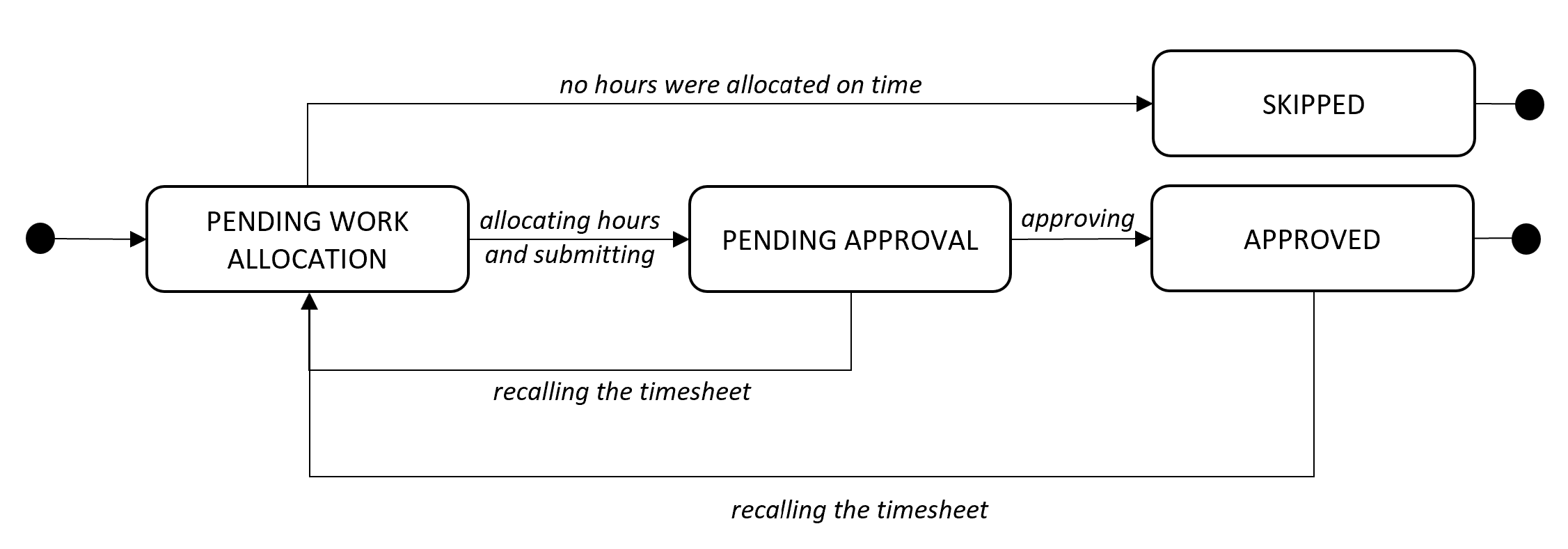
For more information on how to use timesheets, please see the sections below:
Submitting a timesheet
-
Go to My Timesheets
-
Select the correct period by using the filter section
-
Allocate your hours for the week and then for each project you are assigned to
-
Submit your timesheet
- It is not possible to allocate hours to a project for which you have an indirect role. Any hours you failed to allocate to your direct projects will be allocated to all of your indirect projects.
- Users must submit their own timesheet. Other employees are not allowed to submit anyone else's timesheet.
Updating a timesheet when it is already submitted
A timesheet that has been submitted can still be updated:
-
Go to My timesheets and select the timesheet you want to update.
-
Click on Recall
-
The timesheet is now on Pending work allocation, you can update it and modify the hours that have been allocated.
Approving a timesheet
Depending on the role you have, you can only see timesheets for your perimeter.
-
Select the timesheet you want to approve
-
Click on Approve
Some users don't have the possibility to approve their colleagues' timesheets. You can click here to get more details on the permission model.
Users cannot approve their own timesheets. Approvals must be performed in line with the organizational hierarchy.
If you want to approve a group of timesheets, you can click on Select All or tick the timesheets you want to approve and click on Approve Selection.